Ableton UX
Evaluation Suite
Why This Suite Exists
I produce electronic music. I have led the Pittsburgh Ableton User Group for over a decade, serving as a direct liaison to Ableton's international team. I have watched countless beginners encounter synthesis, music theory, and production workflows for the first time. The way Ableton communicates ideas about music shaped how I think about UX and why I decided to pursue it professionally.
I chose Ableton products across a sequence of studies and applied a different method each time. The resulting suite moves from corporate structure to individual interaction patterns on a mobile screen.
That domain expertise is what makes these evaluations different from a generic outside-in inspection. I can distinguish between a design decision and a design failure because I understand the ecosystem from the inside. I know who uses these products, how they use them, and what Ableton is actually trying to accomplish with each one.
Stakeholder Analysis: Ableton Live
Year: 2024
Before evaluating any interface, I mapped the full stakeholder system surrounding Ableton Live. This was research into who has a stake in how the product behaves, and why that matters for design decisions.
Core Stakeholders
Ableton AG is privately held, with the company majority-owned by its co-founders and senior leadership rather than outside investors. The company has publicly described a long-running transition toward broader employee ownership. My stakeholder analysis treated that structure as evidence that long-term user investment can carry more weight than short-term engagement metrics. The source trail is preserved in the original course artifact.
The Ecosystem Layer
Live sits at the center of an ecosystem that includes Push hardware (now standalone with Push 3), Move as a portable standalone groovebox, Ableton Note for mobile capture, Ableton Cloud for project transfer, Max for Live for user-created devices, Ableton Link for cross-application sync, and the Learning Music and Learning Synths educational sites. Partner companies (Akai, Novation, Cycling '74) and a global network of certified trainers, user groups, and educational institutions all orbit the core product.
User Diversity
The user base spans professional producers, DJs, live performers, installation artists, sound designers, film composers, worship directors, educators, students, podcasters, game developers, and Max/MSP developers. Most are hobbyists. Most are male, with the majority in North America. Users tend to stay loyal to a single DAW for years due to the cost and learning investment. Ableton has historically taken a relaxed public stance on piracy, treating cracked installs as a pipeline to eventual paying customers rather than a problem to litigate against. These audience and company-position claims come from the 2024 original course stakeholder analysis and its cited sources.
Why This Matters for Evaluation
Understanding the stakeholder system changes how you read every design decision in the products that follow. Ableton's educational sites are not advertising. They are free, platform-agnostic resources that exist because the company believes in expanding who makes music. The choice to prioritize Live ecosystem consistency over platform-native conventions in Note is not an oversight. It is a bet on the loyalty of an installed base whose per-user investment measures in thousands of hours. These are design decisions you can only evaluate correctly if you know who made them and why.
Heuristic Evaluation: Ableton Note
Year: 2025
Ableton Note is a mobile musical sketchpad for iOS. It is not a companion app or a simplified version of Live. It is a purpose-built tool for capturing musical ideas wherever they happen. The design brief is inherently tense: a professional-grade iOS instrument that needs to be fast enough to capture a fleeting idea, deep enough to be worth using seriously, and connected enough to integrate with one of the most complex creative environments in the world.
Visibility of System Status: Strong with One Gap
Play/stop transforms with a progress ring. Clips show color-fill that advances during playback. Note and modulation data is visible in the session grid. Confident, readable implementations within small-screen constraints.
The gap: Sample View has no playback position marker. For an app built around microphone recording as a core instrument type, this is a missing feedback layer.
Match Between System and Real World: Partial, by Design
The interface mirrors Ableton Live extensively: the Session view grid, the clip color system, the mixer layout. For Live users, the mapping is exact. For a beginner encountering Note as a first instrument, many interface elements are opaque. The icon language is the most concrete problem. Multiple icons activate significant functions without descriptive labels. Even experienced Live users sometimes cannot identify what an icon does without pressing it.
User Control and Freedom: Exceptional
This is Note's strongest heuristic. Undo/Redo are prominent and work throughout the entire application. Perpetual save means the user never thinks about whether their work is safe.
The standout is the Capture function. Capture records whatever the user just played, even if they were not in record mode. Note is always listening. If you improvise something interesting and only realize it afterward, Capture retrieves it. This reflects a deep understanding of how musicians actually work: the best moments often happen before you think to press record. Designing for that reality is not common.
Consistency and Standards: A Deliberate Jakob's Law Exception
Jakob's Law says users prefer interfaces that work like the ones they already know. The standard application would push Note toward iOS conventions. Ableton made the opposite choice: Note is internally consistent with Ableton Live, not with the iOS ecosystem. This is defensible. Live has been one of the most widely used professional DAWs for over two decades. Its users have invested thousands of hours learning its conventions. Note extends that investment rather than replacing it. The cost is that Note is not a good introduction for someone who has never touched Live.
Error Prevention: Designed Around the Musician's Actual Risks
The most important errors in music production are not typos. They are losing a good idea and accidentally overwriting a clip you meant to keep. Undo prevents accidental overwrites. Clip Duplicate preserves versions before experimenting. Perpetual save means nothing is lost by closing the app. Capture prevents the error of not having record running when inspiration struck. One gap: no way to lock a clip to protect it from accidental editing.
Recognition Rather Than Recall: Core Clear, Advanced Buried
The primary workflow is navigable without memorization. Advanced functionality (effects routing, automation, performance mode, sampler configuration) requires exploration through icon-based menus. Once learned, the layout is logical. Before it is learned, it is opaque.
Flexibility and Efficiency: One Significant Bottleneck
Touch-screen constraints eliminate keyboard shortcuts entirely. The more actionable issue is note editing: moving individual notes in a clip requires imprecise touch interactions in a dense grid. Adjusting note length requires precise dragging with little room for error.
Aesthetic and Minimalist Design: Complex Handled Well
Note manages significant functional density without visual clutter. Dark theme, consistent color system, deliberate suppression of decorative elements. This is a multi-instrument sequencer with effects routing on a 6-inch screen, and the interface does not amplify the complexity.
Error Recovery and Help: Designed Out or Absent
Error recovery is a near non-issue by design: perpetual save, perpetual undo, and constraint-based workflows mean recoverable errors are rarely severe. Help and documentation are entirely external. A 56-page manual, onboarding videos on YouTube, and the Ableton community. No in-app help, no contextual tooltips, no onboarding flow. For experienced Live users, not a problem. For anyone arriving cold, a real barrier.
Cognitive Walkthrough: Ableton Learning Synths
Year: 2026
Learning Synths (learningsynths.ableton.com) teaches the fundamentals of subtractive synthesis to complete beginners. It attempts to break down abstract, technically dense concepts for users who do not yet have the vocabulary to ask the right questions. The cognitive walkthrough method evaluates learnability by walking through specific tasks as a target user, asking four questions at each step: Is the user trying to achieve the right outcome? Is the correct action visible? Can the user connect the action to the goal? Does the feedback confirm that the right thing happened?
The Persona
An aspiring music producer just getting started. No equipment, no production software, no understanding of synthesis terminology. One specific goal: approximate a West Coast-style synth lead they heard in a track. That persona is not hypothetical. It is every beginner who has ever opened a synthesizer manual and bounced off the first page.
Sequential Learning: Genuinely Effective
When a user commits to the linear path, Learning Synths works. Buttons are consistent and follow standard conventions. Interactive audio-visual feedback connects abstract concepts to audible results quickly, which accelerates understanding. The progressive structure means each concept builds on the last, and the pacing respects the learner's intelligence.
Outcome-Motivated Navigation: Where It Breaks
A user who arrives with a specific goal (“I want to make that sound”) does not start at the beginning. They scan the menu. They look for something that sounds like what they are trying to make. The West Coast Lead page exists under a section called “Recipes.” To find it, the user must first know that a West Coast-style lead is a “recipe,” then open that section, then correctly associate “Envelopes: CHANGE OVER TIME” (a technical label using undefined vocabulary) with the legato quality they are trying to achieve. At each step, this is a Question 3 failure: the user cannot connect the available action to their goal.
The Key Insight
The site is organized around a theory-first framework: learn the concept, then hear how it applies. Most beginner learners approach synthesis the other way. They have a sound in their head and want to understand enough theory to produce it. The theory-first approach is pedagogically defensible, but the navigation assumes the user already knows which concepts are relevant to their goal. That assumption breaks for anyone arriving with a musical outcome rather than a learning agenda.
Educational interfaces in technical domains almost universally underinvest in the motivational layer. Learning Synths is better than most. The failure is not poor design. It is an assumption about the user's orientation that is baked into the information architecture.
Heuristic Evaluation: Ableton Learning Music
Year: 2025, with additional analysis in 2026
Learning Music (learningmusic.ableton.com) is a free, browser-based music theory course that teaches rhythm, melody, and basic composition to complete beginners. No downloads, no sign-in, no cost. The evaluation applied Nielsen's 10 Heuristics with a four-point severity scale, assessing the interface against established usability principles: learnability, efficiency, error handling, and whether the design supports effective mental models for novice users.
Strengths (Scores 1)
Visibility of System Status: Controls and audio tightly synced. The playhead gives unambiguous feedback. For an audio-first educational interface, this is the most important heuristic, and the site handles it well.
Consistency and Standards: The grid-based step sequencer and piano-roll interface are consistent with professional DAW conventions. A user who finishes Learning Music and opens Ableton Live will recognize the interface metaphors they already learned. This is deliberate and well-executed.
Error Prevention: The guided structure constrains users to valid actions. Choices that would break a musical example are not available. The right call for a beginner tool where the goal is confidence and early success.
Aesthetic and Minimalist Design: Every element has a function. Color marks state changes, not visual interest. The cognitive overhead of learning music theory is high enough that any unnecessary visual complexity would compete with it.
Moderate Issues (Scores 2)
Match Between System and Real World:Standard music terminology is used accurately, but terms like “bars” and “tempo” appear without definition on first encounter. The site assumes a slightly higher baseline than its beginner audience may have.
User Control and Freedom: Navigation between modules is clear. The significant gap: no volume slider. For a platform built entirely around sound, the absence of audio output control is a preventable frustration.
Error Recovery:The site tells users when a task is complete but not why an incomplete attempt was incorrect. For an educational tool, the difference between “you got it wrong” and “here is what was wrong” is significant. Diagnostic feedback corrects mental models. Binary feedback does not.
Priority Issue (Score 3): Help and Documentation
No searchable help system, no glossary, no FAQ, and no way to look up a term used in the course without leaving the site. A user who encounters “syncopation” in Lesson 4 and is unsure what it means has no in-context resource. They must either continue without understanding or leave the learning environment to search externally. The site's content quality is high enough that a glossary would not feel out of place. Its absence feels like an oversight, not a deliberate choice.
Cross-Product Insights
Evaluating three products from the same company with different methods reveals patterns that no single evaluation could surface.
The Insider Assumption
Every Ableton product evaluated here assumes prior familiarity with the Ableton ecosystem. Note mirrors Live's interface conventions rather than iOS norms. Learning Synths organizes content around technical vocabulary that beginners do not have. Learning Music uses industry-standard terminology without defining it on first encounter. The pattern is consistent: Ableton designs for the user who already speaks their language. This is a coherent philosophy, not an accident. It works for the core audience. It creates a real onboarding gap for everyone else.
Sequential Design, Non-Sequential Users
All three products assume a linear user journey. Note assumes you learned Live first. Learning Synths assumes you will start at lesson one. Learning Music assumes you will work through the curriculum in order. Each product works well for users who follow the intended path. Each product creates friction for users who arrive with a specific goal and try to navigate directly to it. The cognitive walkthrough of Learning Synths made this most visible, but the pattern holds across the suite.
Minimalism as UX Philosophy
Ableton's visual restraint is consistent and intentional across every product. Note suppresses decorative elements on a 6-inch screen. Learning Music uses color for state, not decoration. Learning Synths lets the audio-visual feedback carry the cognitive load. This is not a style preference. It is a design posture that respects the complexity of the domain and trusts the user to focus on the content rather than the chrome.
Help Is the Consistent Gap
Note has no in-app help. Learning Music has no glossary. Learning Synths has no contextual prerequisites. The stakeholder analysis revealed that Ableton relies on a network of certified trainers, user groups, community forums, and external documentation. This is not laziness. It is a model that externalizes the support layer to the community. The model works for engaged users who already know where to look. It fails for the exact users Ableton's educational products are supposedly designed to reach: people who are encountering this world for the first time.
Domain Expertise Changes What You See
The stakeholder analysis contextualized Ableton's ownership structure and community investment model. The heuristic evaluations identified specific interface-level violations. The cognitive walkthrough revealed information architecture assumptions invisible to heuristic inspection alone. No single method would have produced this picture. The suite format is the point.
Cognitive Accessibility Evaluation: Web and Live 12
Year: 2026
Applied eight COGA-grounded criteria to ableton.com (including Learning Music and Learning Synths) and Ableton Live 12. The scope: ADHD, dyslexia, autism spectrum, working memory impairments, and executive function challenges. The method: expert inspection against W3C cognitive accessibility principles. The finding: Ableton designs for people who already speak their language.
What Works: Learning Music as Benchmark
Learning Music is what cognitive accessibility looks like when it is built on purpose. Chapters are concept-based (“Beats,” “Chords,” “Melodies”) and sub-lessons are outcome-oriented: “Make beats,” “Make some chords.” A beginner or someone with cognitive processing differences can orient by what they want to create, not what they already know. Generous whitespace, muted color palette, and tight audio-visual synchronization reduce distraction and support focus. This is not accidental. It directly addresses working memory limitations and attention challenges.
What Fails: Icon Labeling (Both Platforms)
The cognitive accessibility evaluation found that unlabeled, application-specific icons demanded prior knowledge rather than recognition. The transport bar, browser, device chain, and mixer in Live 12 all rely on small, unlabeled icons. The Capture button (a dotted circle) is meaningless without prior knowledge. The fold/unfold triangles, the I/O toggle, and the return track indicators carry no text labels. For users with visual processing differences or working memory impairments, this creates a mandatory memorization burden before basic navigation is possible. ableton.com's product pages fail similarly: terms like “waveshaping,” “FM operators,” and “filter topologies” appear without definitions.
Live 12: Motor Accessibility Yes, Cognitive No
Live 12 made real progress on screen reader support, keyboard navigation, and high-contrast themes. That investment is genuine and it matters. But it all targets motor and sensory accessibility. Within this evaluation's tested scope, I found no simplified view, focus mode, icon labels, or plain-language tooltips aimed at the cognitive barriers the study examined.
The interface is a cognitive load problem by default. On first launch, a user sees clip slots, multiple tracks, send channels, a Master track, a browser panel, an unlabeled toolbar, a transport section, and an information overlay simultaneously. For a working producer, that is a workspace. For a first-time user, it is overwhelming. There is no “start here” state and no progressive disclosure. Every feature is visible at once.
The Dual-View Cognitive Switch
Session View and Arrangement View represent fundamentally different mental models of music: nonlinear clips versus linear timeline. Switching between them requires holding the state of one view in working memory while operating in the other. For users with working memory impairments, this context switch is where sessions fall apart. There is no contextual explanation anywhere in Live about when or why to use each view.
Recommendations
Icon labels (persistent or a “Show labels” toggle, as Push hardware already does). A “First Session” simplified mode that hides everything except transport, one audio track, one MIDI track, and browser. Glossary tooltips on product pages. Apply Learning Music's outcome-based navigation model to Learning Synths (“How sounds are made” instead of “Oscillators”). A one-time view-switching explainer. None of these require a redesign. They require bringing the same intentionality to cognitive accessibility that Live 12 already demonstrated on motor and sensory.
The Case for Growth, Not Compliance
Cognitive barriers rarely arrive as support tickets. They appear as abandoned sessions, unfinished lessons, and users who never convert. The original evaluation cites estimates that ADHD affects roughly 6 percent of US adults, dyslexia affects 15 to 20 percent of the population, and one in five adults worldwide can understand only simple texts or solve basic arithmetic (OECD PIAAC 2023). Those populations overlap, so this study does not claim a combined share of Ableton users. The defensible finding is narrower: the tested interface demanded recall, symbol interpretation, and hidden-state tracking that created avoidable barriers.
Skills Demonstrated
A dotted circle is not self-explanatory
The original cognitive-accessibility evaluation identifies Ableton Live’s Capture button, shown as a dotted circle, as meaningless without prior knowledge. The recommendation is concrete: pair icon-only controls with labels or explanatory tooltips. This is expert review and cognitive walkthrough work, not disabled-user testing.
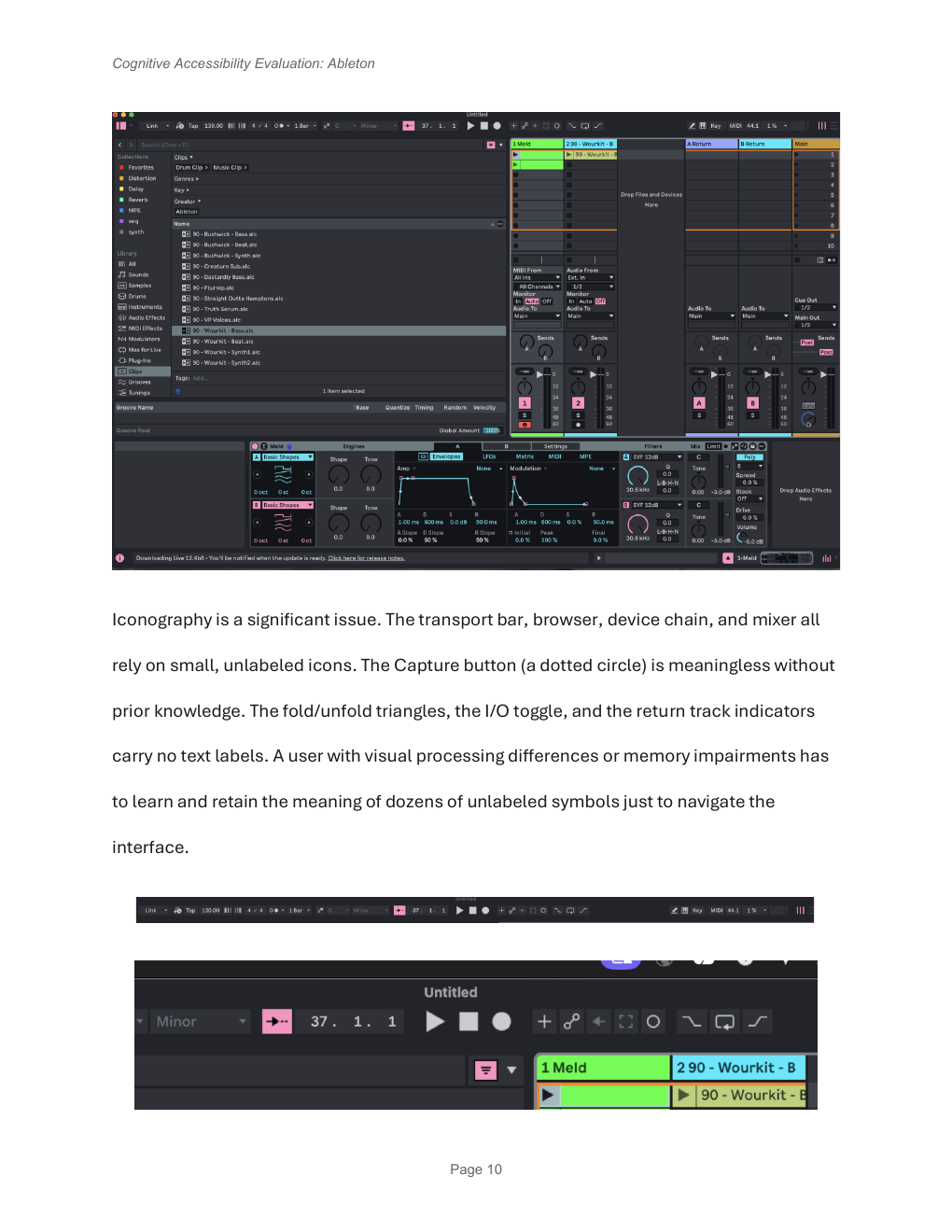
Evidence note Cognitive Accessibility Evaluation: Ableton, p. 10, Iconography section. Public excerpts preserve original page content; textual summaries identify the original locator and omit private material.
Original Submissions
- Stakeholder Analysis of Ableton Live (original course artifact)
- Heuristic Evaluation: Ableton Note (original course artifact)
- Cognitive Walkthrough: Ableton Learning Synths (original course artifact)
- Heuristic Evaluation: Ableton Learning Music (original course artifact)
- Cognitive Accessibility Evaluation: Web and Mobile Design (original course artifact)